# Week 1: Introduction to User Interface Design

Welcome to the User Interface Design (UID) course! This course will teach you how to design a mobile application from begining to end. While we cover some of the essentials of the UX process, our main focus will be design principles, platform specifications and advanced use of the Figma design tool. The UX process will be explored more deeply in level 3 MAD9034. Our class meets once a week for three hours to learn Design processes and apply practical knowledge together in the lab. To make the most of this course, it's crucial to attend the class as there will be guided practical learning and in class exercises. Active participation and attendence is essential to your success in the course.
Reading and watching the content provided each week before class will allow you to be more prepared and to better grasp the various concepts and techniques.
# Learning Objectives
- Have an understanding of the MAD9020 User Interface Design course
- Have a high-level understanding of the Design Process
- Step 1 of the design process: Understand
- User needs and business goals to create a wholistic design solution
- Practical Knowledge: Getting started in Figma
# The Design Process
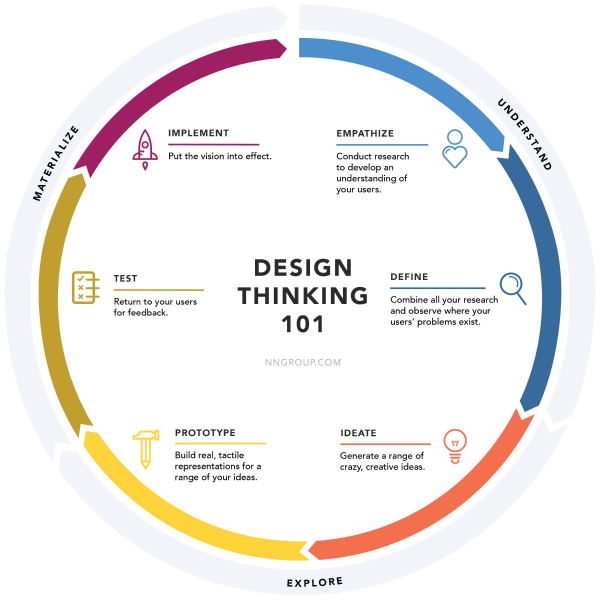
- Learn: Listen. Observe. Ask questions
- Define: problems & opportunities
- Ideate: Generate ideas & solutions
- Build: Create a prototype to demo idea (s)
- Validate: Test design with users, learn and prototype again
# Learn buisness goals and user needs
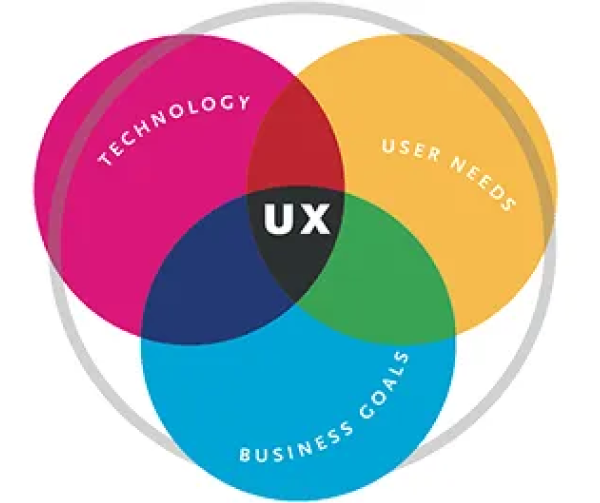
In order to create a meaningful application, it is crucial to understand the user needs or problems as well as the business goals behind it. A good solution solves the user's need while serving the business goals using the best available technology.
# Device: Desktop vs Mobile
The type of device we are designing for has an impact on the features we include. Device is not only about screen size but it also affects the context in which a user is utilizing the application. Users tend to do different tasks on laptop vs mobile device. It is essential to consider the user's context when choosing the features that go into a desktop or a mobile app.
# Required preparation for class
# Watch
# Read
- The UX Design Process (opens new window)
- 10 Mobile UX Design Principles You Should Know (opens new window)
# Resources and references
Figma:
- Ensure to use Figma Education (free for students) (opens new window)
- What's new in Figma (opens new window)
- Organize your canvas with sections (opens new window)
- Figma Best Practices (opens new window)